A process can be informally defined as a running program, this because the program itself is something lifeless, that just sits on the disk. It’s just a collection of lines of codes and assets. It becomes a process when it’s executed.
Processes can run concurrently on a machine thanks to virtualization.
What is part of a process?
In order to know what is part of the process, we need to know that parts of the machine are needed in order for the process execution.
- Address space, defined as the memory that the process can address. This is made out of the program instructions that are read in memory from the disk, along with the data that the running program reads and writes.
- Registers, which are accessed by many instructions.
- Persistent storage, accessed by some processes.
Process API
When we think of a process, we should also have some kind of interface that allows us to alter the process state. The essential actions that such API should allow are^[more details of the C implementation in Process APi in C]:
- Create: an OS must include some method to create a new process. (i.e. when you run a command into the shell, or when you double click on a program, the OS is creating a new process);
- Destroy: an OS must include a method to destroy a previously created process in a forcefully way. We say forcefully because usually processes will exit by themselves when complete, but sometimes we may want to kill them (if they are frozen or if we don’t need the result anymore and we want to quit);
- Wait: a method that allows us to wait for a process to stop running may be useful;
- Miscellaneous Control: other then creating and killing a process, other types of controls are useful, such as being able to suspend a process and then resume it.
- Status: an OS should expose an interface that allows to get the information about the process status, such as how long it has run for or what state it is in.
Process Creation
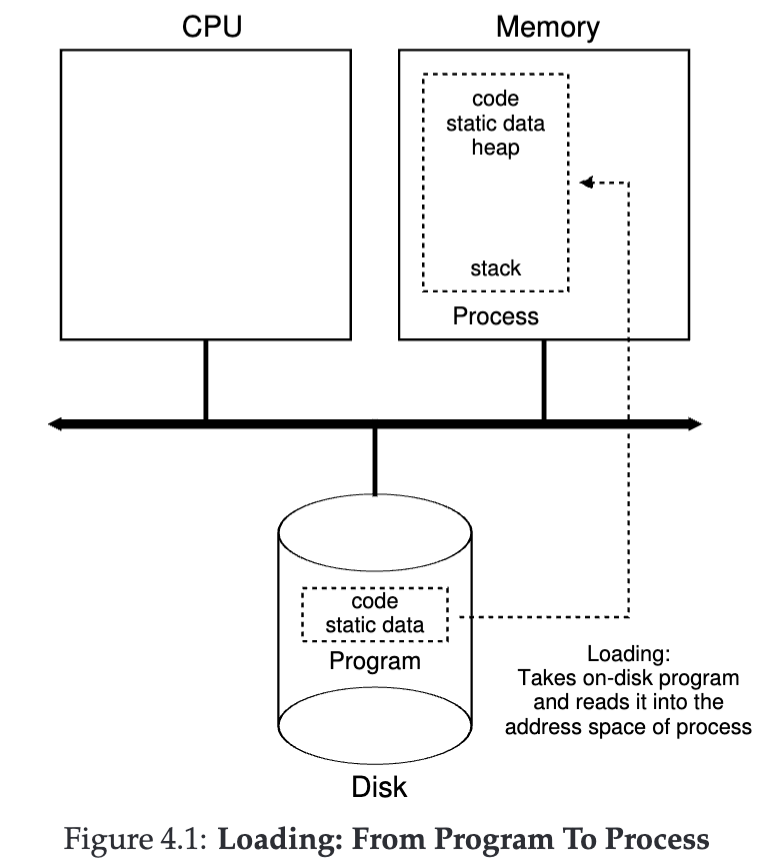
Let’s dive a little bit in more detail about how to create a process, which means transforming a lifeless program that reside on disk into a running process.
-
The first step the OS must do is load the program code form the disk (HDD or SSD) into memory (in the address space of the process). In early OSes, the loading process was done eagerly, meaning the whole program was loaded into memory all at once. In modern OSes the task is performed lazily, meaning the data and code si loaded only when is needed during the program execution. This is useful since modern programs can have a very numerous lines of codes and heavy assets, and lazy loading allow to preserve memory.
-
Then some memory is allocated for the program’s stack (or runtime stack), which in most of the languages (such as C) is used for local variables, function parameters and return addresses. The
main()function and theargcandargvare initialized in this stack by the OS. -
Another piece of memory is allocated for the program’s heap. In the C programming language, the heap is used for explicitly requested and dynamically-allocated data. It’s requested by using the
malloc()function, and freed when using thefree()function. The heap is used for data structures like Linked List, Hash Map, Tree and others. The heap allocation is dynamic, meaning that it will be small at first, and grow when more memory is requested with themalloc()function. -
The final step, which begins the program execution, is jumping to the
main()function, where the OS transfers the control of the CPU to the newly-created process.
For a more practical info about the process API in C, look at Process APi in C.
Process States
As we can see from the figure, a process can be in one of three states:
- Running, meaning the process is running on the CPU, and it’s executing instructions;
- Ready, meaning it’s ready to run, but the OS has chosen not to run it in that particular given moment because of some reason (like the scheduling policy);
- Blocked, meaning the process has performed some kind of operation that makes it not ready until that operations finishes. A common example is when a process initiate an I/O request to a disk, which is a slow operation compared to memory access. This will block the process until the operation has finished.
There are also some other special process states, which are:
- Initial (or Embryo), which is the state the process is in when it’s being created by the OS;
- Final (or Zombie), which is the state the process is in when it has exited but has not yet been cleaned up. This is useful since other processes, like the parent, can analyze the return code of the Zombie process.
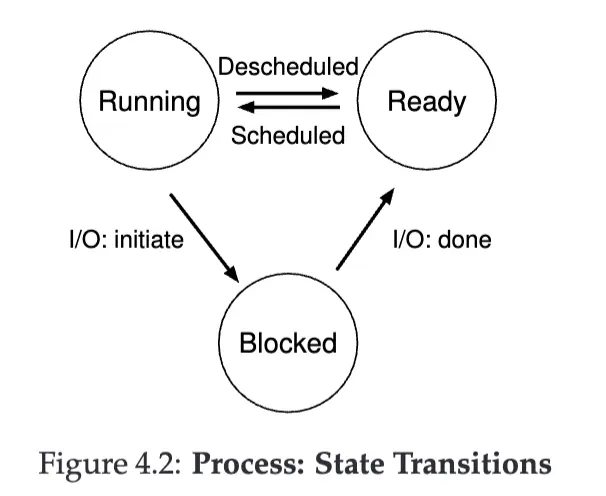
The figure shows us how a process can transition through the states.
How do operating systems track processes?
The operating system is just a program, and it uses some data structures in order to track relevant pieces of information, such as the process list with their status, in order to know when to schedule, deshedule or block a certain process. It should also track the I/O operations, to know when a certain event completes. It may also track other information about the currently running process.
An important piece of information used in real OSes is the register context, which holds the contents of the register state for a stopped process, which is put into memory when stopped and loaded back into the registers when the process is resumed. This is called context switch.
Here is an example of a process data structure:
// The registers xv6 will save and restore
// to stop and subsequently restart a process
struct context {
    int eip;
    int esp;
    int ebx;
    int ecx;
    int edx;
    int esi;
    int edi;
    int ebp;
};

// The different states a process can be in
enum proc_state {
    UNUSED,
    EMBRYO,
    SLEEPING,
    RUNNABLE,
    RUNNING,
    ZOMBIE
};

// The information xv6 tracks about each process
// including its register context and state
struct proc {
    char *mem; // Start of process memory
    uint sz; // Size of process memory
    char *kstack; // Bottom of kernel stack for this process
    enum proc_state state; // Process state
    int pid; // Process ID
    struct proc *parent; // Parent process
    void *chan; // If non-zero, sleeping on chan
    int killed; // If non-zero, have been killed
    struct file *ofile[NOFILE]; // Open files
    struct inode *cwd; // Current directory
    struct context context; // Switch here to run process
    struct trapframe *tf; // Trap frame for the current interrupt
};
Usually this kind of structure, that stores information about a process, is called Process Control Block (PCB).
tags: computer-architecture operating-systems resources: Page=61 - Chapter 4